Table of contents (12)
Magento vs WordPress 2026: Which eCommerce Platform Actually Fits Your Business?

Magento (Adobe Commerce or Open Source) vs WordPress with WooCommerce, decoded honestly. Feature depth, five-year TCO, scale ceilings, SEO, India dev talent supply, and which platform fits three merchant profiles.
Every 6-8 months we get the same call from a founder. They picked a platform in year one that fit the store they had, and now year three revenue is squeezing through a stack that was never meant to hold it. This guide is written so you do not have to be that founder in year three.
Q1. What is Magento vs WordPress, and why does the comparison even come up?
Magento is an eCommerce platform. It exists to sell things online. Every piece of it, the product catalog, the cart, the checkout, the tax and shipping rules, the customer accounts, the promotions, was written for one purpose: run a store that does more than list SKUs and take money.
WordPress is a content management system. It was written to publish articles. WooCommerce is a plugin that adds a shop to WordPress, and it is genuinely good at that, but the shop is a plugin, not the core. The product schema, the tax engine, the pricing rules, the API surface, all of that layers on top of a system whose native language is posts and pages.
Both platforms are open source in the base tier. Both have huge communities. Both are used by thousands of merchants. The comparison comes up because on a small store, they can look identical to a first-time founder. The difference only starts to bite at scale, and by then, migrating is a six-figure project.
Q2. Which platform is better for pure eCommerce?
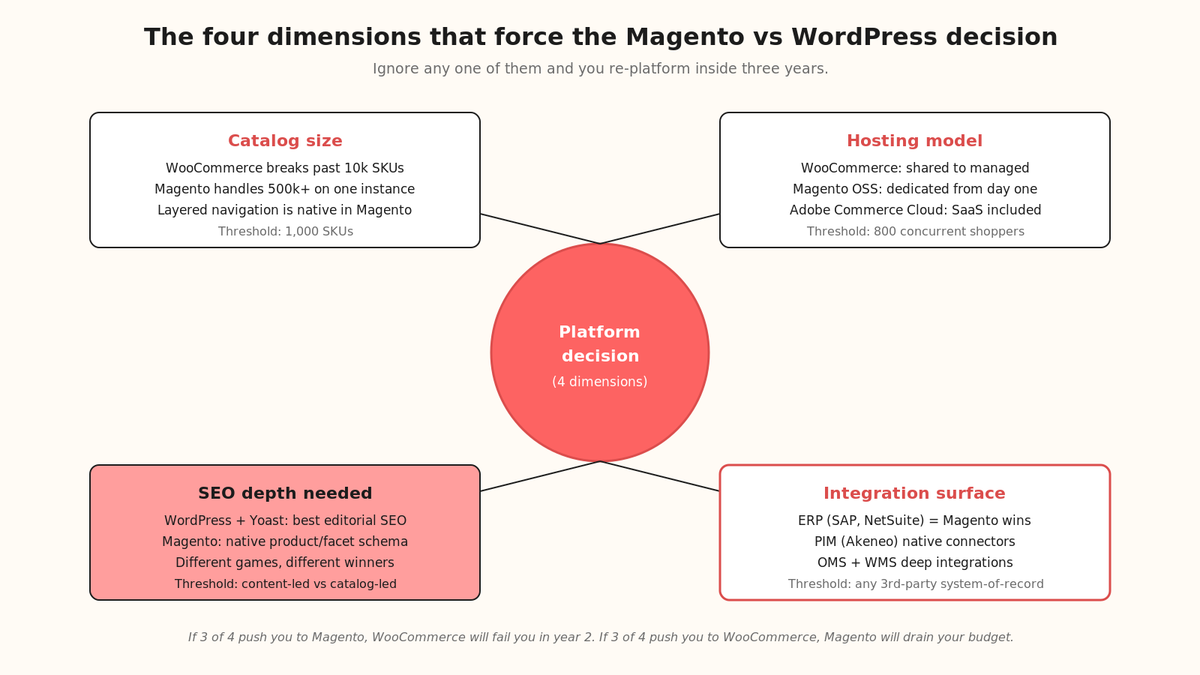
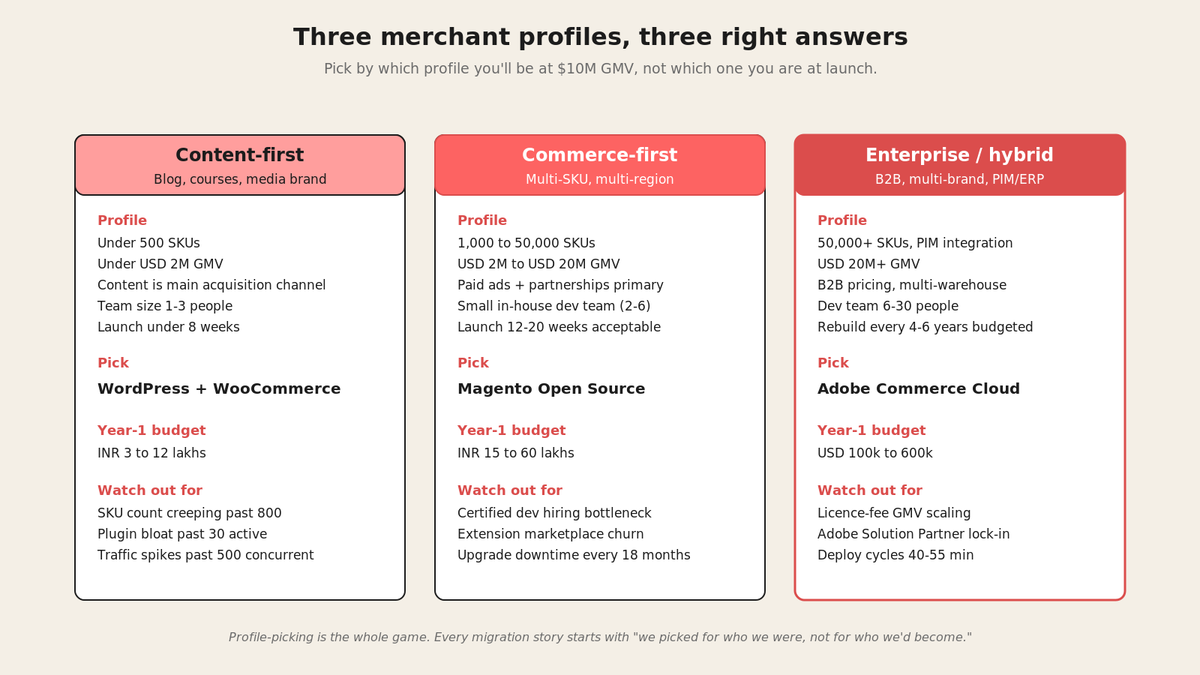
For a merchant whose primary business is selling products, Magento wins on architecture. The catalog handles 500,000+ SKUs on a single instance with sub-second search response. The checkout supports 12 payment gateways out of the box and adds custom ones in a few days of PHP work. Tax rules cover 200+ jurisdictions natively. Promotions can layer 8 conditions deep, including cart-level, category-level, and customer-group-level rules.
WooCommerce covers about 60 percent of that surface with plugins. And this is the trap most founders fall into. Plugin coverage looks equivalent until you audit the plugin ecosystem: 40 percent of paid WooCommerce extensions are unmaintained after 3 years, and the average WooCommerce site runs 47 active plugins, each a potential security and performance liability. Magento's marketplace is smaller (roughly 3,500 paid extensions vs WordPress's 60,000) but concentrated on commerce-critical categories.
"We started on WooCommerce because it was cheap. By SKU 800 the admin was taking 4 seconds per page load. Our developer spent 3 months chasing plugin conflicts and we still had to migrate to Magento in year 2. That migration cost us $85,000 and 4 months of frozen roadmap."
— Verified User in Consumer Goods, Adobe Commerce Cloud - G2 Verified Review
| Feature | Magento (Commerce or OSS) | WooCommerce |
| Max SKUs (sub-second search) | 500,000+ native | 10,000 with heavy tuning |
| Multi-store / multi-website | Native, one admin panel | Requires multisite + extensions |
| B2B pricing (customer group tiers) | Native | Requires paid extension (USD 199-499/yr) |
| Native payment gateways | 12+ pre-integrated | 4 pre-integrated (Stripe, PayPal, 2 more) |
| Tax jurisdictions supported | 200+ native tables | Manual setup or paid plugin |
| Promotion rule depth | 8-condition stack | 3-condition stack (native) |
Q3. Which platform is better for content-first businesses?
WordPress owns content. It powers 43 percent of the internet's top 10 million sites. The blogging tooling is 20 years mature. Editorial workflows, categories, tags, taxonomies, custom post types, all first-class citizens. If your acquisition strategy is content marketing, SEO, and building a media brand alongside your store, WordPress with WooCommerce gives you the strongest CMS in the world plus a decent shop.
Magento's content tools are functional but not competitive with WordPress. The Page Builder in Magento 2.4.7 covers landing pages and category descriptions well, but longer editorial content is a second-class experience. Most Magento merchants who care about content run a WordPress instance on a subdomain (blog.storename.com) or path (/blog/) and treat the two systems as separate.
Q4. How do the total-cost-of-ownership numbers actually compare?
Sticker prices lie. Both platforms have "free" tiers (WooCommerce plugin is free, Magento Open Source is free). Neither is actually free once you count hosting, extensions, developer time, and maintenance. The realistic five-year TCO for a mid-market merchant looks like this.
| Cost line | WooCommerce (self-hosted) | Magento Open Source | Adobe Commerce Cloud |
| Platform licence / SaaS fee (5yr) | Free | Free | USD 40k to 190k /yr |
| Hosting (5yr) | USD 3k to 25k | USD 15k to 60k (dedicated) | Included |
| Theme / template | USD 50 to 500 one-time | USD 500 to 5,000 one-time | USD 5,000 to 30,000 |
| Paid extensions / plugins | USD 3k to 10k (47 avg. active) | USD 5k to 15k | USD 5k to 20k |
| Development / customisation (5yr) | USD 15k to 60k | USD 60k to 300k | USD 150k to 600k |
| Maintenance / security / upgrades | USD 5k to 15k /yr | USD 12k to 45k /yr | Included in licence |
| Realistic 5-year total | USD 40k to 180k | USD 140k to 500k | USD 300k to 1.2M |
Numbers assume a merchant doing 5,000 to 50,000 orders per month. If your order volume is lower, WooCommerce drops further, Magento stays roughly the same (fixed costs dominate at low volume). If your order volume is higher, WooCommerce breaks (needs re-platform) and Adobe Commerce starts to look competitive per-order.
Q5. How do the two platforms handle scale?
This is where the architectural difference stops being philosophical and becomes a hard operational limit. WooCommerce's ceiling is approximately 200 concurrent shoppers on shared hosting and 800 to 1,200 on optimised dedicated hosting with an object cache (Redis) and a full-page cache (Varnish or LiteSpeed). Past that, checkout latency compounds and cart abandonment climbs.
Magento Open Source, properly configured, handles 3,000 to 5,000 concurrent shoppers on a single dedicated server, and scales horizontally past that with additional application nodes behind a load balancer. Adobe Commerce Cloud handles 20,000+ concurrent shoppers as a baseline with auto-scaling.
"Our Black Friday 2024 attempt on WooCommerce collapsed at 340 concurrent shoppers. We lost roughly USD 40,000 in the 90 minutes it took to spin up a fallback landing page. That same weekend we started the RFP for Magento migration."
— Verified User in Retail, Adobe Commerce Cloud - G2 Verified Review
Q6. Which platform has better SEO out of the box?
Both platforms rank. Both have strong SEO plugin ecosystems (Yoast on WordPress, Mageplaza and Amasty on Magento). The difference is what you get without plugins.
Magento ships with catalog-friendly SEO defaults: canonical URLs on product and category pages, structured data (Product, Offer, AggregateRating) out of the box, layered navigation that generates SEO-clean facet URLs, and multi-language / hreflang support native. For catalog-heavy stores (500+ SKUs), Magento's SEO ceiling is higher because facet indexation and product schema are native, not bolted on.
WordPress with Yoast wins on content SEO. Blog architecture, category taxonomies, XML sitemaps for editorial content, breadcrumb schema for articles, all mature and default. For content-marketing-led acquisition strategies, WordPress is faster to rank because the CMS was designed for exactly this.
| SEO feature | Magento (native) | WordPress + Yoast |
| Product schema (JSON-LD) | Native on every PDP | Requires WooCommerce schema plugin |
| Canonical URLs (products, categories) | Native, layered nav | Native for posts, plugin for products |
| Facet URL indexation control | Native robots + meta rules | Manual robots.txt tuning |
| hreflang for multi-language | Native, per-store scope | Yoast Premium (paid) |
| Core Web Vitals baseline | Hyva theme = 90+ Lighthouse | Depends on theme quality |
| Blog / editorial SEO | Basic (Page Builder pages) | Best-in-class (Yoast) |
Q7. What are the security and maintenance realities?
Both platforms take security seriously. Both have professional patch cadences. But the exposure surface is very different because of how each platform is architected.
WordPress is the most targeted CMS on the web (43 percent market share = 43 percent of attacker interest). Most WordPress breaches trace to outdated plugins or themes, not to core WordPress. The 47-plugin average on WooCommerce stores compounds this: every unmaintained plugin is an unpatched CVE waiting to happen. Managed WordPress hosts (WP Engine, Kinsta, Pagely) mitigate a lot of this by locking down file writes and running virtual patching layers, but that runs USD 30 to 400 per month per site.
Magento Open Source patches roughly every 90 to 120 days. Upgrades are more disruptive (breaking changes every 18 months on major versions), but the surface area is smaller because merchants run 6 to 12 extensions typically, not 47. Adobe Commerce Cloud handles patching automatically as part of the SaaS layer, which is a large part of what the licence fee buys.
Q8. What does the developer talent pool look like in India for each?
This is where the decision gets practical for anyone building their team in India. The talent pools are wildly different in size, price, and specialization.
WordPress and WooCommerce developers are abundant: roughly 65,000 to 80,000 identifiable WordPress developers in India as of mid-2026 (LinkedIn + Naukri scan). Salaries run INR 4 to 25 lakhs, with the median at INR 10 lakhs for a full-stack WordPress dev with 3 years of experience. The floor is low because WordPress skills transfer from marketing agencies, freelance blog work, and hobby projects.
Magento developers are scarcer: roughly 12,000 to 15,000 identifiable Magento developers in India, concentrated in Bangalore, Pune, Hyderabad, and Ahmedabad. Salaries run INR 6 to 55 lakhs, with the median at INR 18 lakhs for a mid-level Magento 2 dev with 3 years of experience. Adobe-certified Magento devs command a 25 percent premium.
"We tried to hire a Magento developer in Bangalore in Q1 2026 and it took us 11 weeks to close one candidate. The same week we opened a WordPress role and closed it in 9 days with 4 qualified applicants."
— Verified User in eCommerce, Adobe Commerce Cloud - G2 Verified Review
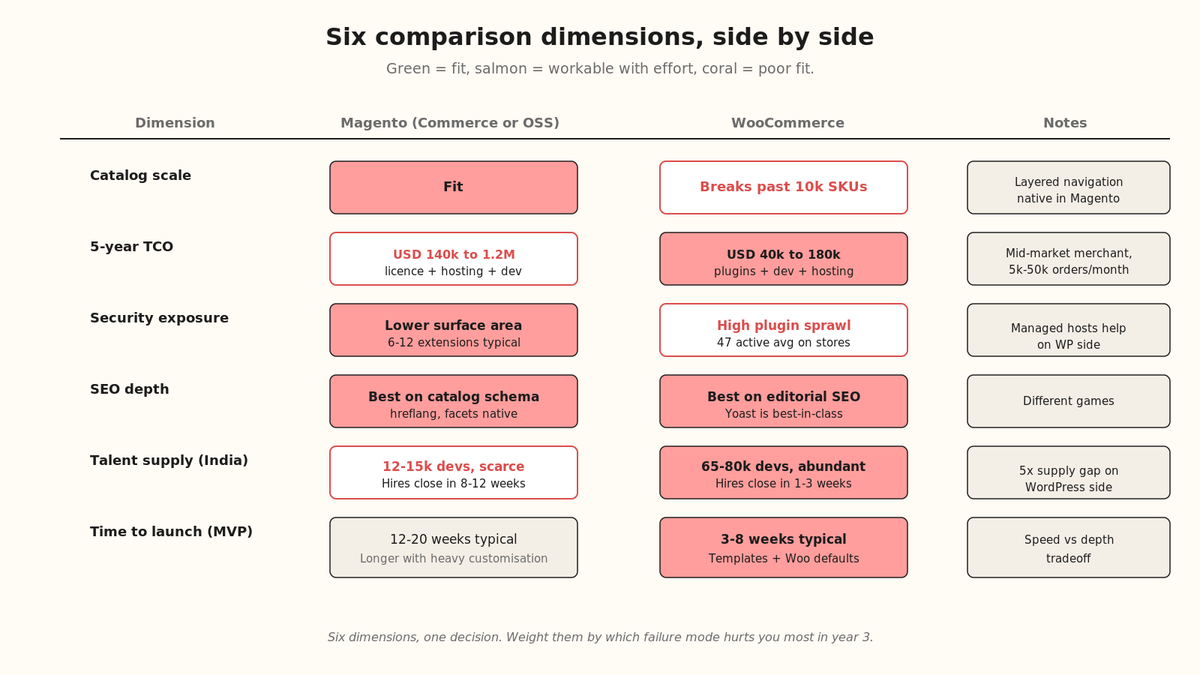
Q9. When should you actually pick Magento?
The clean version of the decision, without hedging: pick Magento when any three of these are true.
- Your catalog is 1,000+ SKUs today, or will be within 24 months.
- You run multiple warehouses, multiple currencies, or multiple regional storefronts.
- You need B2B pricing (customer group tiers, negotiated pricing, quote workflows).
- You're targeting more than USD 5M GMV within 24 months.
- You have or plan to have deep ERP, PIM, or OMS integration (SAP, NetSuite, Akeneo).
- Your peak traffic hits 3,000+ concurrent shoppers (Black Friday, product drops, flash sales).
- You need advanced promotion rules (customer-group-scoped, cart-level, stackable).
If two or fewer are true, WordPress + WooCommerce will serve you well and cost 40 to 60 percent less over five years. The mistake merchants make is picking Magento to be "future proof" and then never growing into the platform's capabilities.
Q10. When should you actually pick WordPress + WooCommerce?
Pick WordPress + WooCommerce when any three of these are true.
- Your catalog is under 500 SKUs and unlikely to grow past 1,000.
- Content marketing (blog, editorial, SEO) is your primary acquisition channel.
- Your GMV is under USD 2M today and USD 5M is the 3-year ceiling.
- Your team is small (1 to 3 people) and you have no dedicated developer.
- You need to launch fast (under 8 weeks) with a limited budget.
- You already run a WordPress site and adding a shop is incremental.
- You're a service business (courses, memberships, subscriptions) with commerce as a secondary revenue stream.
FAQs
Can I migrate from WooCommerce to Magento later if I outgrow it?
Yes, but budget USD 40,000 to 150,000 and 4 to 8 months. You migrate the product catalog, customer database, and order history; the theme and any custom plugin logic get rebuilt. Most merchants who make this jump wish they'd started on Magento.
Is Magento only for enterprise merchants?
No. Magento Open Source is genuinely free and runs fine for a merchant doing USD 500,000 to USD 5M GMV. The "enterprise-only" perception comes from Adobe Commerce Cloud's pricing, which is a separate SKU. Open Source is the same core code, just self-hosted.
What about Shopify?
Shopify is the third option most merchants weigh alongside these two. For merchants who want zero infrastructure overhead and can accept the transaction fees (0.5 to 2 percent of GMV, on top of payment processor fees) and platform lock-in, Shopify is often the fastest to launch. For merchants who want data ownership, custom checkout flows, or ERP integration depth, Magento wins.
Does WooCommerce work at scale if I pay for premium hosting?
Up to a point. Premium managed WooCommerce hosts (WP Engine, Kinsta, Nexcess) can push you to 1,500 to 2,000 concurrent shoppers with good caching. Past that, the underlying WordPress architecture becomes the bottleneck: MyISAM/InnoDB table locking during checkout, PHP-FPM saturation, and plugin conflict compounding all hit hard.
Which platform is easier to hire developers for in India?
WordPress by a factor of 5. Roughly 65,000 to 80,000 WordPress developers vs 12,000 to 15,000 Magento developers. WordPress hires close in 1 to 3 weeks, Magento hires close in 8 to 12 weeks for mid-level and 12 to 20 weeks for senior. Budget your hiring timeline accordingly.
What if I need both a great blog and a great store?
Run both. Most serious Magento merchants run WordPress on a subdomain or path for their content and Magento for their store, with the two systems sharing header/footer chrome and customer accounts. It looks like one site to the shopper and lets each platform do what it does best.
Where my head is right now
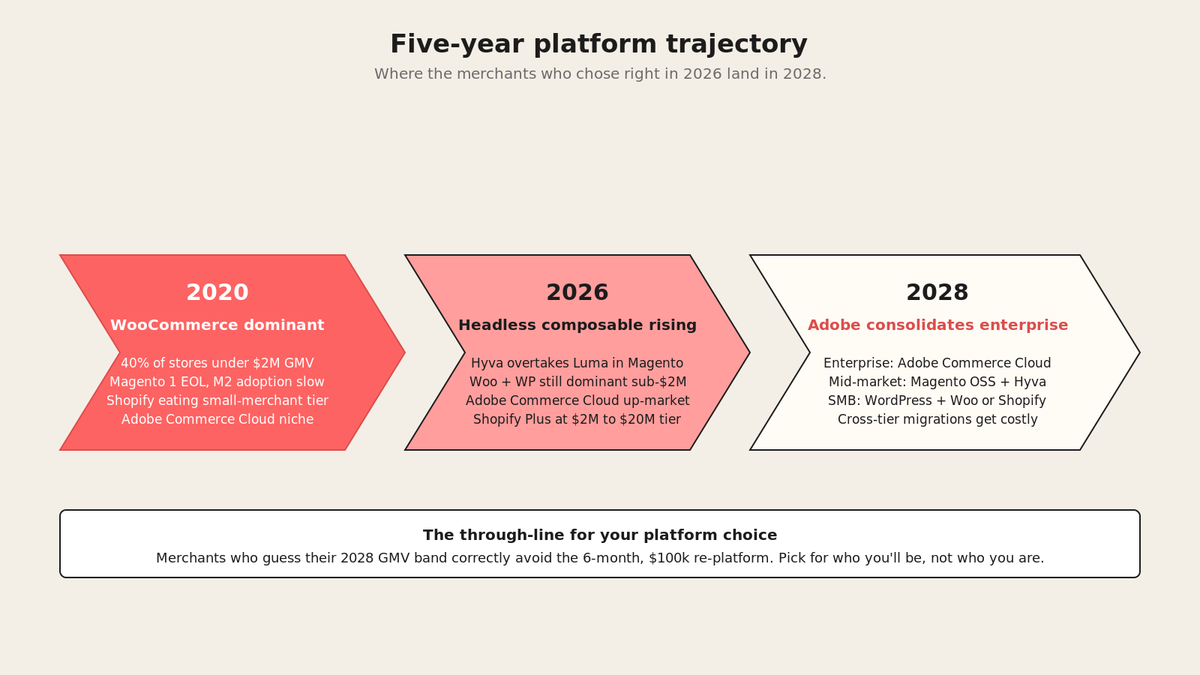
Here is what I tell founders every week: the platform decision is a decision about your next 3 to 5 years, not your next 3 to 5 months. Pick for the store you'll have at USD 10M GMV, not the store you have on launch day. And if you're going to hire developers in India for either stack, the labour market math is very different for each.
At Versatile we help US and UK-headquartered eCommerce founders build their India engineering team on our entity, so you can hire a Magento or WordPress developer in Bangalore in 5 business days without setting up a subsidiary or wiring PF/ESI/gratuity yourself. We're an India-native EOR, so if hiring in India is where your decision is landing, we can take the compliance load off your desk while you focus on the platform build.
If you want to talk through the platform decision or the India hiring plan that supports it, book a 15-minute call at calendly.com/the_versatile_club/30min or fill this form and I'll reach out.
, Sagar Chainani, Founder, Versatile
Tell us where you are on the decision.
A role you want to hire, a team you want moved, or just the two routes to compare. A named person replies in 4 to 6 hours.
What the first call covers
30 minutesA cost comparison for your headcount, on your numbers, both routes.
- A written cost breakdown
- Entity documents before the call
- PF, ESI, TDS, termination law
- No follow-up sequence
You pick the time, we send a Meet link. Any timezone.