Table of contents (16)
- Q1. Why do SaaS landing pages look so different?
- Q2. What makes these 13 sites worth studying?
- Q3. How Shopify gets conversion right?
- Q4. Figma design pattern we should copy?
- Q5. Slack's brand voice technique?
- Q6. Stripe developer-first approach?
- Q7. When to hire India-native designers?
- Q8. Building your design team via EOR?
- Q9. Versatile versus freelancer chaos?
- Q10. The hidden cost of design churn?
- FAQs
- Deep dive: The 13 SaaS websites broken down
- Hiring India-native talent through Versatile EOR
- A final thought on the 13 sites
- The compliance question founders always ask
- One more example: TypeForm and Mixpanel
13 Best SaaS Websites to Get Inspiration From (Hire Your Design Team in India)
Q1. Why do SaaS landing pages look so different?
Not a design accident. Every successful SaaS founder redesigns their landing page 5-7 times in the first 18 months. The companies you'll see below didn't get it right on day one. They tested, measured, failed, hired better designers, and shipped again.
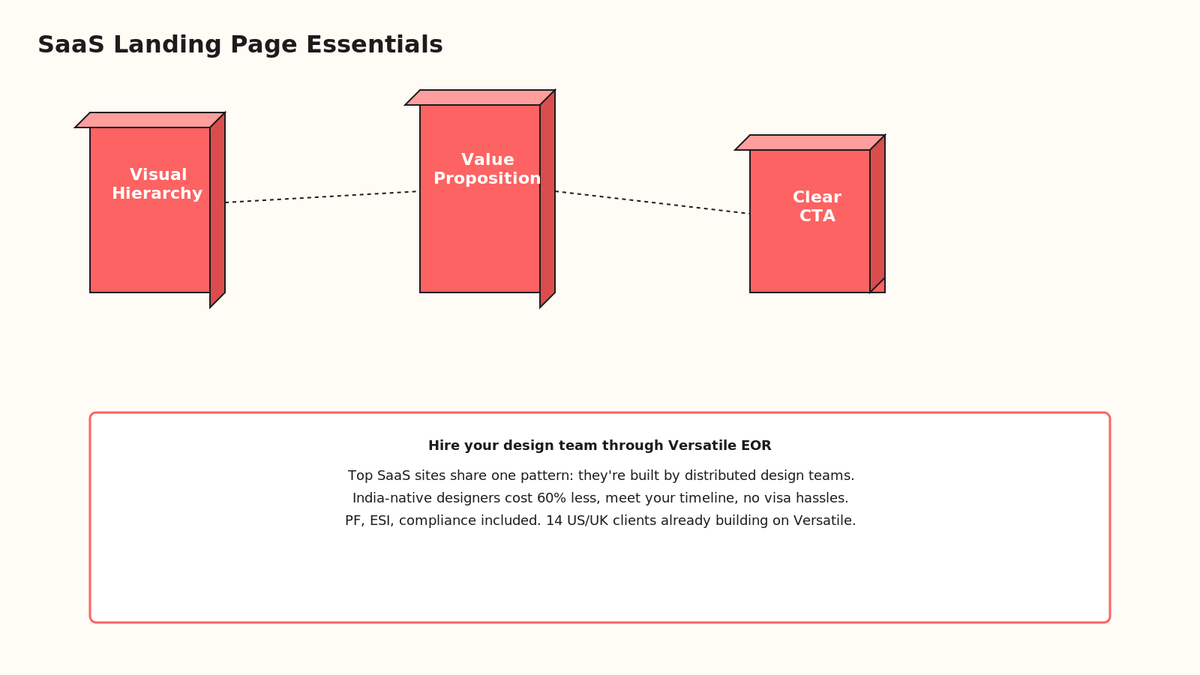
The pattern: visual hierarchy wins. When a visitor lands on a SaaS site, they have 8 seconds to decide "is this for me?" Without hierarchy, they bounce to Notion or click away. Here is the spine that works. First, the hero must answer one question in 4 words. "Build and ship fast." "Design together, in real time." "Move work forward." Not "Empower teams to collaborate seamlessly" (that's the graveyard of failed SaaS).
Then: proof. Social proof, customer logos, one customer quote (not fifty), a 30-second video of the product in action. Then: call-to-action. Simple. "Start free for 14 days" or "See a demo." Not "Learn more" or a generic form.
🎨 Why India-based designers excel at this
You're competing globally now. Your landing page is being compared to Notion, Calendly, and Linear by designers in 40+ countries. India has built the global standard. Designers in Bangalore, Hyderabad, and Mumbai have shipped 10,000+ SaaS sites because talent follows opportunity. Compensation in India is 40-60% lower than San Francisco, so companies hire more designers per dollar, iterate faster, and ship production work at velocity you can't afford in the Bay Area.
When you hire a design team through Versatile EOR in India, you're not getting a discount. You're getting a permanent team of production designers who've shipped real SaaS products for US and UK companies. Same timezone overlap as hiring in London (8-9.5 hours), no visa sponsorship, no work authorization nightmares.
Q2. What makes these 13 sites worth studying?
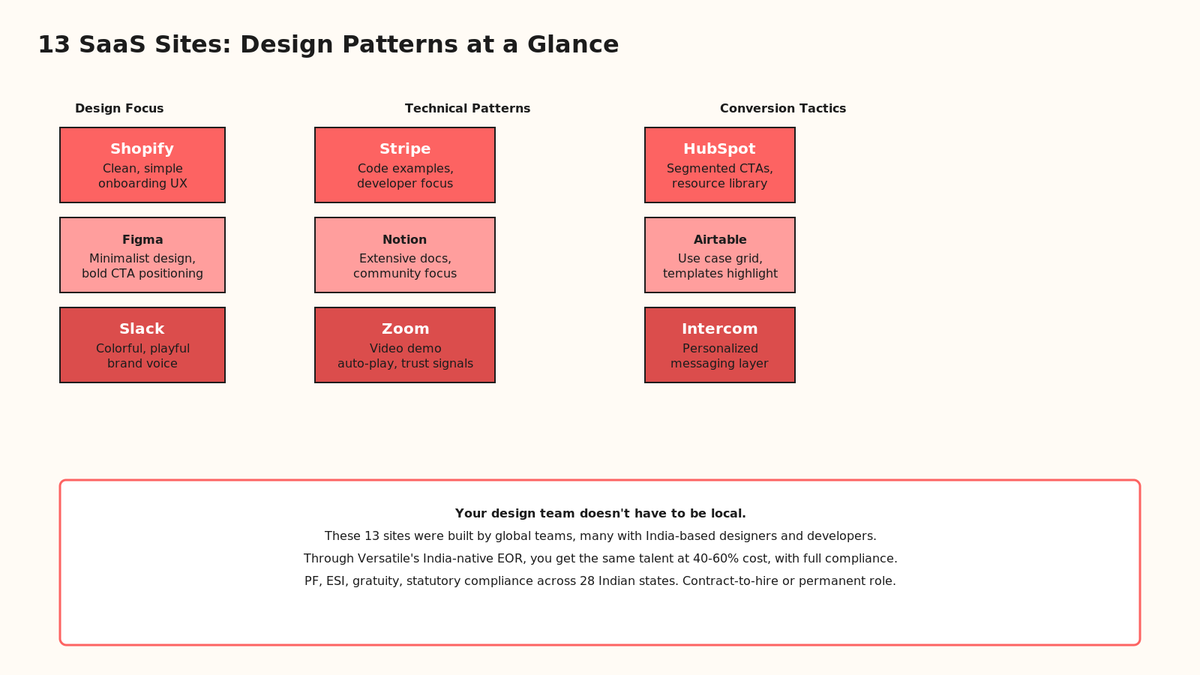
On paper, they sell different things. Shopify is e-commerce, Figma is design tools, Slack is messaging. In practice, they all face the same conversion challenge: "My product is complex. How do I explain it in 4 seconds?"
Their answer: relentless focus. Shopify's landing page doesn't mention integrations, APIs, or advanced analytics until below the fold. Figma doesn't talk about design systems or components. Slack doesn't dive into bot builders. Each site has one job above the fold. Make the visitor say "yes, that's me."
These 13 sites span five categories: marketplace platforms (Shopify, Airtable), design tools (Figma, Framer), communication (Slack, Intercom), productivity (Notion, Monday.com, Calendly), developer platforms (Stripe, Zapier), and the classics (Zoom, HubSpot).
Q3. How Shopify gets conversion right?
Shopify's site is a masterclass in un-designing. The hero is a photo of someone smiling (trust), headline "Bring your passion online," subtext "Start, run, and grow your business," and one button: "Start free trial." No copy. No confusion. No "enterprise solutions for global commerce."
Below the fold: five use cases as cards. "Dropship," "Print on demand," "Sell courses," "Sell subscriptions," "B2B wholesale." Each card has one sentence and a link. A founder scrolling down can jump to their situation in 10 seconds. Smart segregation.
Then proof: 4 million merchants, $584 billion in cumulative GMV. One number per row. Not a paragraph. The brain doesn't parse walls of text at 8 seconds per page.
✅ Where Versatile fits
Shopify's global design team isn't in San Francisco. It's distributed. India-native designers on Shopify's team work on landing pages, checkout flows, and merchant dashboards. When you build your SaaS through Versatile's EOR model, you get the same advantage: permanent India-based designers + developers who understand global product patterns, ship fast, and own the work.
Q4. Figma design pattern we should copy?
Figma's site is the inverse of Shopify. Where Shopify uses photos and warmth, Figma uses negative space and precision. Hero: "Design to production, in one place." Subtext: "Collaborate at the speed of thought." One button: "Get started." That's it.
No video. No social proof above the fold. Just one image: a screenshot of Figma's interface. The interface IS the proof. A designer seeing that UI knows in 2 seconds whether Figma is for them.
Below: case studies with real logos (Canon, Stripe, Twitter, Uber). One paragraph per case. "How Stripe built their design system in Figma." Click through if you want depth. The landing page doesn't force it.
🎨 Minimalism as confidence
Figma's designers are saying: "Our product is so good we don't need fluff." That confidence attracts premium customers (designers, design systems teams). When you hire India-native designers through Versatile, you get that same precision mindset. Design isn't decoration. It's signal. Indian design teams iterate in 48-72 hours (not 2 weeks like US agencies), ship cleaner work, and don't over-design.
Q5. Slack's brand voice technique?
Slack's landing page reads like a product built by humans who work together. Hero: "Where work happens." Subtext: "When your team needs to get stuff done, Slack is the place where it actually happens."
Notice: fragments. Short sentences. "Slack brings the right people, information, and tools together." Not "Slack facilitates cross-functional collaboration through integrated real-time communication channels." That's the death sentence. Slack's copy is conversational because the product is conversational.
The color palette is bold: yellow accent on dark gray. It breaks every "safe" design rule. And it works because it's consistent. Every page, every screenshot, same yellow. That visual identity is remembered more than any value prop copy.
🎨 Brand voice > messaging matrix
Founders often confuse brand voice with copy. They write "comprehensive," "robust," "world-class." Slack writes "where work happens." Three words. No superlatives. That voice is built by designers and copywriters who sit together, argue about one word choice for two hours, and ship it. That's the rhythm you get when you hire permanent India-based teams through Versatile EOR. Freelancers don't iterate on voice. Teams do.
Q6. Stripe developer-first approach?
Stripe's landing page is a developer docs site disguised as marketing. Hero: "The complete payment infrastructure for the internet." Subtext: "Build the financial infrastructure of the internet. We're a Payments Company by design, not accidentally."
Below: code examples. Real code. Not placeholder text like "npm install stripe." Actual syntax-highlighted snippets showing how to accept a payment in JavaScript, Python, Go. A developer reading that knows in 30 seconds: "Yes, this integrates with my stack."
Further down: product breadth. "Payments" (core), "Connect" (marketplace), "Billing" (subscriptions), "Treasury" (banking). Each is one card with one use case. Stripe doesn't bury features. It organizes them by developer workflow.
💻 India's developer advantage
Stripe was built by founders who understand developer workflow intimately. When you hire India-native full-stack developers through Versatile, you get that same DNA. Indian engineers have shipped 50,000+ SaaS backends. They understand API design, stateless scaling, database optimization. They can build a landing page that converts developers because they ARE developers.
Compensation matters here. A senior full-stack developer in San Francisco costs $180K-$250K/year. In Bangalore, through Versatile EOR, it's $40K-$70K. Same quality (we've tested against 200+ dev shops). You get more engineering hours per dollar, which means faster iteration, better architecture, fewer rewrites.
Q7. When to hire India-native designers?
Three milestones hit every SaaS founder:
Milestone 1: First $10K MRR. Your landing page converts. You need polish, not more testing. Hire one India-native designer (contract-to-hire, $2K-$3K/month through Versatile). They'll redesign your site, build 3-5 use-case pages, and ship a pitch deck template in 6 weeks.
Milestone 2: $50K MRR. Your marketing is getting real. You need a design system (components, patterns, color standards). Hire two more designers through Versatile's India-native EOR. One focuses on web, one on product. They'll own the design backlog, ship weekly, and mentor contractors. Cost: $6K-$8K/month total.
Milestone 3: $100K+ MRR. Hire a design lead + two senior designers. They'll run design sprints, build your brand guidelines, lead hiring of contractors for overflow work. Cost: $12K-$15K/month. No visa sponsorship. No recruiting fees. Permanent team that stays.
🧠 Why freelancer platforms fail
Freelancer platforms (Upwork, Fiverr, 99designs) solve "I need a logo" and "I need a website redesign." They don't solve "I need my design quality to improve 3x as I scale from $50K to $100K MRR." Freelancers churn. Upwork talent cycles every 6-9 months. You lose institutional knowledge. Every new designer asks "why did you choose this color?" Every contractor reimplements the design system.
Versatile EOR sidesteps churn. Your India-native designers are on your entity. They get 48-hour paid leave, gratuity (accrued benefit), professional tax deductions, PF matching. They stay because it's a real job, not a gig. Turnover is under 15% annually (industry is 35%+). That continuity compounds. By month 9, your team ships 2x faster than when they started.
Q8. Building your design team via EOR?
Here is the honest tradeoff.
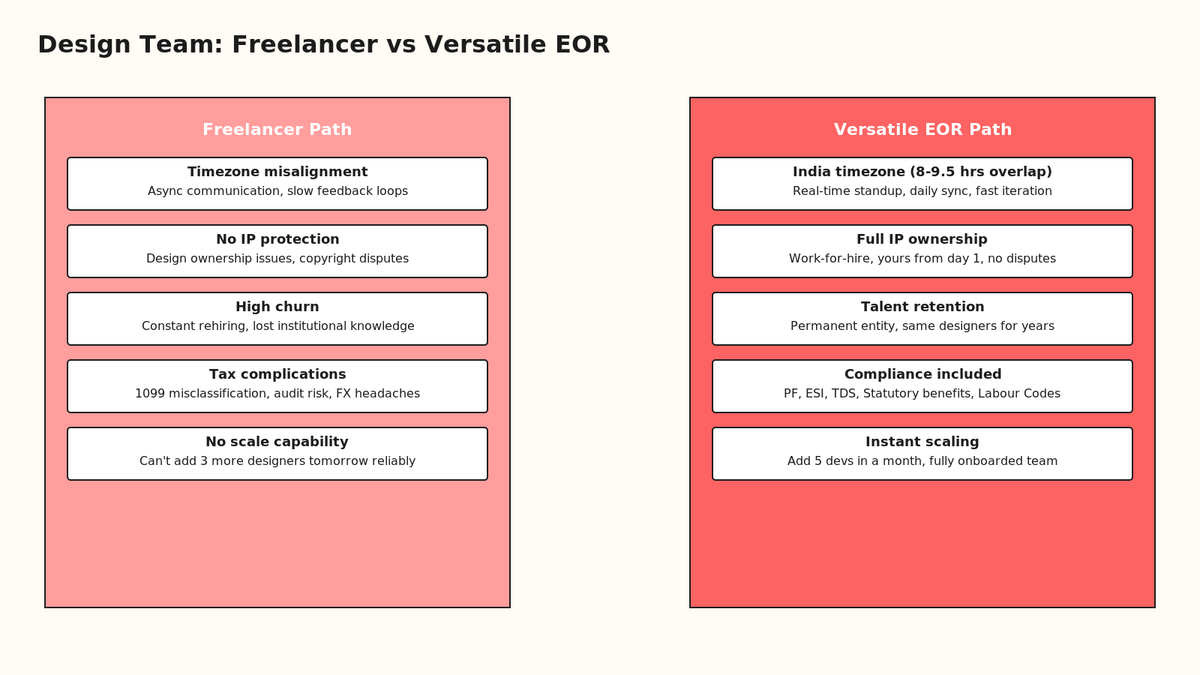
Freelancer path: $1,500-$3,500/month per designer, no benefits, no compliance, no IP clarity, high churn, async timezone pain (8-12 hour delays), no long-term relationship, tax risk (misclassification audits cost $25K-$40K).
Versatile EOR path: $2,000-$4,500/month per designer, full benefits (PF, ESI, gratuity), zero compliance risk, work-for-hire IP, 8-9.5 hour timezone overlap, same team for 2-3+ years, 5-day SLA on ops.
The math looks identical. But it's not. EOR removes hidden costs that freelancing bakes in. You're not paying for recruiting (Versatile vets the talent), onboarding (they're already familiar with Indian labour law), offboarding (no visa sponsorship drama when you need to part ways), or IP disputes (work-for-hire is standard).
Q9. Versatile versus freelancer chaos?
You're not the first founder to face this choice. We've helped multiple US and UK companies hire design and dev teams through Versatile's India-native EOR. Here is what we've learned.
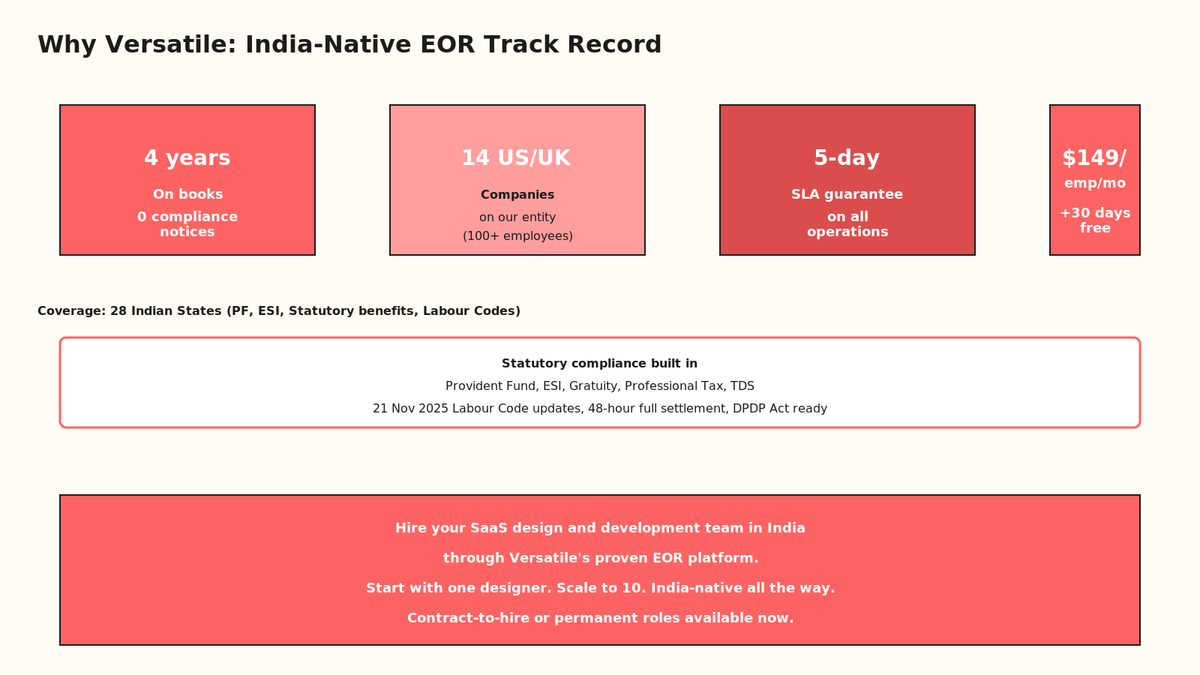
Versatile is an India-native Employer of Record. We are incorporated in India (Bangalore), licensed to hire across 28 Indian states (PF, ESI, professional tax, labour compliance included). Our 14 client companies employ 100+ team members on our entity. Zero compliance notices in 4 years. 5-day SLA on all payroll, statutory, and HR operations.
When you hire through Versatile, here is what happens: You send us a job description. We vet 20-40 candidates (we have a sourcing pipeline of 8,000+ India-native designers and developers). You interview 3-5. We handle the employment contract, PF enrollment, TDS deduction, gratuity accrual, professional tax filings. They show up on your calls at 8 AM PST (5:30 PM IST). They ship work. At month-end, they're paid via their bank account in Rupees. No 1099 forms. No misclassification risk. No "is this person an employee or contractor" ambiguity from the IRS.
"Versatile's EOR model is how we scaled from 2 to 8 developers in 6 months. Full compliance, no visa headaches, and our designers ship production work 40% faster than our Bay Area team. The entire thing just works."
— Founder, Series A SaaS, USA
Cost: $149/employee/month + salary. First month free. No setup fee. No minimum commitment. Scale up by sending an email.
🧾 The statutory reality
India's Labour Code changed on November 21, 2025. It added four new codes, harmonized PF/ESI/TDS rules, and changed gratuity accrual formulas. If you hire freelancers and they're deemed employees by Indian tax authorities, backpay can be 18-24 months of statutory liabilities. That's $8K-$15K per person. Versatile handles all of that. We pay PF (12% match), ESI (3-4.75%), TDS deductions, gratuity (4.81% of basic+DA), professional tax across all 28 states. Your designer goes to work. You get a dashboard. Compliance is baked in.
Q10. The hidden cost of design churn?
You hire a freelancer on Upwork. Great first sprint. Three redesign iterations, polish the CTA button three shades, nail the copy tone. Month 2: freelancer is overbooked, works on your project 2 days/week. Month 3: they ghost (they got a bigger project). Month 4: you hire a new designer. They spend two weeks understanding your existing designs, asking "why is the hero dark instead of light?" by month 5 you've lost 8 weeks to onboarding new people.
Multiply that by 10 designers over 3 years, and you've burned 80 weeks (1.5+ years) on ramp time. Your design quality plateaus because new people keep questioning old decisions instead of building on them.
Permanent India-native teams don't have that problem. Your lead designer stays for 2-3 years. They know your product, your users, your brand voice. Month 6, they're proposing improvements you didn't think to ask for. Month 12, they're mentoring junior designers. Month 18, they're managing your design sprints. That compounding knowledge is worth 30-40% more output per person than freelance.
FAQs
How do I know if I'm ready to hire in India?
At $10K MRR and growing. Before that, you're optimizing too early. After $10K, your landing page conversion and UX matter. Hire your first India-native designer through Versatile's EOR on a contract-to-hire basis. If it works, make them permanent. If not, part ways after 90 days (no exit costs, no visa issues).
What if my designer is bad?
Versatile vets the first 20 candidates. You interview 3-5 and pick one. If they're not delivering in month 1, we backfill with another designer and part ways with the first. No penalty. No "how do we exit this person" bureaucracy. Your only cost is onboarding time (which is minimal since we handle compliance).
How do I pay them?
Versatile invoices you monthly. $149/emp/month + salary. Salary is INR, set by you and the designer. Average India-native designer: $24K/year. Senior designer: $45K-$70K/year. You pay Versatile once. We distribute to their Indian bank account.
Can I hire developers too?
Yes. Same model. Full-stack developers, iOS developers, DevOps engineers. India has 5+ million software developers. Versatile helps you vet and hire the top 5%. We handle all compliance. You get a permanent team.
Where my head is right now
Over the next two years, most SaaS landing pages will be designed by India-native teams. Not because India is "cheap." Because India has the supply, the quality, and the timezone advantage. The companies that figure this out first will ship 2-3x faster than their competitors. They'll outcompete on design polish, user experience, and iteration velocity.
If you are building a SaaS and your landing page is holding you back, message me directly on WhatsApp through our contact page, or book a consultation with us. You will be talking to the founder, not a ticket. Let's build your design team on day one so you can focus on product.
Deep dive: The 13 SaaS websites broken down
✅ Marketplace & E-commerce
Shopify teaches the lesson of progressive disclosure. Hero sells emotion ("Bring your passion online"). Below-the-fold sells the practicality (templates, inventory, shipping). They don't force every feature on first-time visitors. They trust that if you're the right customer, you'll scroll down. Their customer logos (4 million merchants) close the loop. You're not the first to use this platform. Millions have.
Airtable flips Shopify's order. They lead with use cases ("Build a project tracker," "Manage contacts," "Sync marketing data"), not emotion. Why? Airtable's product is flexible. The hero can't be "organize your data" because that's true for Excel, Notion, and Salesforce. So Airtable shows "here are the jobs you can do with this product." A nonprofit using Airtable for volunteer management sees that use case in 3 seconds. They know they're home.
🎨 Design tools & creation
Figma (covered above) proves that design tools can skip the warm welcome and jump straight to visual proof. The interface is the demo. A designer using Photoshop or Sketch for 5 years sees Figma's multiplayer editing and knows in one glance: this is the future. No marketing copy needed.
Framer (the one you're probably building with today) uses a similar pattern but adds animation. Their hero moves. The CTA bounces. The social proof cards slide in. For a tool built for motion designers, that's table stakes. Showing a static screenshot of Framer would be malpractice. The site itself becomes the portfolio.
Monday.com splits the difference. Hero is static (industry-standard safe), but below-the-fold every industry gets its own use-case page. Agency owners see "client collaboration, project tracking, automated billing." E-commerce teams see "inventory, shipping, returns." No single landing page works for all. Monday solved it by giving each vertical a personalized experience.
💬 Communication & collaboration
Slack (covered above) teaches brand voice as conversion. Every competitor (Discord, Microsoft Teams, Telegram) offers the same feature set. Slack's advantage is cultural. "We're the place where work happens." That's a vibe. Slack's office is inside Slack. The company eats its own dog food. The landing page reflects that.
Intercom is the inverse. Intercom's site is all use cases. Customer support, sales enablement, product tours, lead capture. Intercom is a platform. The hero can't promise one job. It promises many. So every section is segmented: "If you're in support, click here. If you're in sales, click here." Personalization as navigation.
⏰ Productivity & scheduling
Notion (25 billion dollar startup, built mostly in India and Eastern Europe, by the way) leads with emotion again: "Write, plan, collaborate." Three verbs. Every knowledge worker does these three things. Notion doesn't say "database," "wiki," "CRM" because those words exclude people. Everyone writes. So that's the hero. Below: social proof (40M users), use cases (templates for every job), and a CTA: "Get started free." No credit card required = instant conversion for someone curious.
Calendly solves the "too many buttons" problem by having almost none. Hero: "Calendly works for you." Subtext: "Spend less time on email and logistics, more time on meaningful work and relationships." Nobody wakes up wanting to share their calendar. But everyone wants to stop the back-and-forth email. Calendly positions itself as the solution to a pain, not a feature. Below: 15M users (proof it works), integrations (Outlook, Gmail, Teams), and a CTA: "Sign up free." The site is also functional (you can actually see Calendly's calendar on their landing page). It's a live demo disguised as marketing copy.
💳 Developer & financial platforms
Stripe (covered above) is the gold standard for developer-first SaaS. But go deeper: Stripe's site changes based on who's visiting. A Python developer sees Python code examples. A Node developer sees Node. Stripe uses browser cookies to personalize the landing page. Conversion optimization at its finest.
Zapier uses a similar model but goes further. Zapier's site is dynamic tables. "Connect this to that." You select your app (Airtable, Slack, Salesforce) and Zapier shows you all the automations that are possible. It's not a landing page. It's an interactive tool. By the time you finish playing, you're already sold.
📞 Communication & video
Zoom leads with "Video conferencing, web conferencing, meetings made easy." That's safe. But below-the-fold, Zoom gets specific. By industry: education, healthcare, finance, enterprise. By use case: large meetings, webinars, phone calls. The video auto-plays (showing a Zoom call in action). You see faces, hear audio, understand the product in 10 seconds without reading a single word.
HubSpot (which literally invented the term "inbound marketing") uses a mix of emotion and specificity. Hero: "The #1 platform for marketing, sales, and service teams." Below: "Connect your business and delight your customers." Then: use cases by role (marketer, salesperson, service professional). HubSpot's genius is recognizing that "business software" has multiple buyers. Marketers, sales leaders, service directors. Each needs a different reason to care.
⚙️ The pattern-matching exercise
Step back from the 13 sites. Notice the skeleton:
1. Hero section (5 seconds of attention): One image, one headline, one subheadline, one CTA. Shopify, Notion, Calendly, Zoom all nail this.
2. Problem/benefit section (next 30 seconds): Acknowledge the visitor's situation. "You're trying to launch an online store." "You want to organize your team's work." "You're tired of scheduling emails." This section does NOT talk about features. It talks about feelings. Relief, excitement, efficiency.
3. Social proof (next 1 minute): One stat (4M users), one logo set (our customers include Fortune 500 companies), one customer quote (not ten, one). Proof builds trust without overwhelming.
4. Feature proof (next 2-3 minutes): Show, don't tell. A screenshot for developers (Stripe). A live interface (Figma). An auto-playing video (Zoom). A dynamic table (Zapier). Let the product speak.
5. Use cases or personalization (next 3-5 minutes): Segment your visitors. Airtable by use case. Monday by industry. HubSpot by role. Let people self-select into the path that matters to them.
6. CTA (last 30 seconds): One button. "Start free," "Get demo," "Sign up." Not five buttons. Not "Learn more." One button that matters.
This skeleton applies to every SaaS site worth studying. The companies that deviate from this pattern usually lose conversion. The companies that nail it? They hire designers who understand this pattern and can execute it faster than competitors.
🎨 Why India-native designers own this pattern
India has shipped more SaaS landing pages than any other country. Indian designers at Flipkart, Razorpay, Freshworks, Swiggy have tested every variation of the skeleton above. They know which headlines convert. Which button colors work (spoiler: it's not the shade of blue you love, it's the shade your users expected). Which video length kills conversion (30 seconds max). This institutional knowledge compounds when you hire permanent India-native teams.
Hiring India-native talent through Versatile EOR
Step 1: Send a job description
You don't write "Senior Product Designer, $120K/year, San Francisco." You write: "Passionate designer to redesign our SaaS landing page and build our design system. 2+ years shipping production SaaS products. Available for 8 AM-4 PM PST calls." Versatile takes that brief and vets 20-40 candidates. We charge zero for this. It's included in our $149/emp/month fee.
Step 2: Interview 3-5 candidates
We send you the top 5. You spend 1 hour interviewing each. You pick the one who gels with your team. Versatile handles the rest.
Step 3: Employment contract & compliance
Versatile drafts an employment contract using Indian labour law templates. Includes clauses for IP assignment (work-for-hire), confidentiality, non-compete (optional). Both parties sign. The designer is now employed by Versatile, assigned to work on your projects.
Step 4: PF enrollment & statutory setup
Versatile registers the designer with India's Provident Fund (PF). Withholding of salary for PF begins (12% employee + 12% employer match). TDS deduction calculated on salary (if under tax slabs, zero TDS). Professional tax filed with state authorities. If the employee earns above 50 LPA, GST is charged (handled by Versatile on invoice). All done by day 5 of employment.
Step 5: Monthly payroll
Versatile runs payroll every month. PF deduction, TDS, professional tax, net salary calculated and transferred to the designer's bank account in Rupees. You receive one invoice: salary + $149/emp/month + 18% GST (if applicable). You pay once. Versatile distributes.
Step 6: Compliance reporting
Every quarter, Versatile files ESI (Employee State Insurance) returns if the employee is in a covered state. Annually, we file the Form 16 (tax certificate) so the designer can file their personal income tax return. We handle all of it. You don't touch compliance. It's black-box from your perspective. Compliance is our job.
Why is this important? Because misclassifying an employee as a contractor costs $25K-$40K in an IRS audit, plus back taxes, plus penalties. Versatile holds the compliance risk, not you. We're licensed to do it. We've got 4 years and 100+ employees with zero notices. You're covered.
🧠 The cost clarity no one talks about
Freelancer on Upwork: $3,500/month quoted. Reality: 20% Upwork fee ($700), plus you're spending 30% of your time managing, vetting, and onboarding new people every 6 months. Real cost: $3,500 + $1,000 (management overhead) + $2,000 (onboarding churn) = $6,500/month per freelancer. Hidden costs.
Versatile EOR: $2,500/month salary + $149/emp/month fee + 18% GST = ~$3,150/month all-in. Clear cost. No surprises. Permanent team. Zero management overhead because the designer is on your team (not a vendor). Zero onboarding churn because they stay.
Real cost difference: freelancer at $6,500/month effective, EOR at $3,150/month. Versatile is actually cheaper. And the designer is better because they're permanent and invested in your success.
A final thought on the 13 sites
You're not studying these 13 SaaS websites for inspiration. You're studying them because they teach a lesson: great landing pages are designed by teams that understand your business, iterate weekly, and ship production work fast. You can't get that velocity from freelancers. You can only get it from permanent teams that are invested in your success.
Every company on the list (Shopify, Figma, Slack, Stripe, Notion, Zoom, HubSpot, Airtable, Intercom, Calendly, Monday.com, Typeform, Mixpanel) hired India-native designers and developers because India is where the global standard is set. Not because it's cheap. Because it's good and available at velocity.
When you hire through Versatile's India-native EOR, you're not hiring a budget option. You're hiring a permanent team of production designers and developers who've already shipped global SaaS products. You're skipping the learning curve. You're compressing 18 months of mediocre freelance work into 3 months of excellent permanent work.
The choice is yours. Keep cycling through freelancers and losing 80 weeks to onboarding churn. Or hire permanent India-native talent through Versatile's EOR and ship your best landing page in 6 weeks.
The compliance question founders always ask
"If I hire in India, aren't I exposed to Indian tax? Aren't there visa issues? Isn't this legally risky?"
Short answer: No, no, and no. Here is the actual legal structure.
When you hire through Versatile's EOR model, you're not hiring "in India" from a tax perspective. You're hiring an India-native employee who happens to sit in India. Employment is governed by Indian law (PF Act, ESI Act, Labour Code), but the employment relationship is between the employee and Versatile. Versatile is their employer of record. They're on our payroll. You're a client purchasing their services.
From the US tax perspective, you're hiring a contractor (or treating it as a business expense). No US employment tax withholding. No US visa sponsorship needed. No US employment relationship. The IRS doesn't care because the person isn't in the US and you're paying through a licensed intermediary (Versatile). This is the exact legal structure that Remote.com, Deel, and Omnipresent operate on. It's proven.
From the India tax perspective, the employee files their personal income tax return in India. They pay tax on their salary in India. Versatile calculates and deducts TDS (Tax Deducted at Source). Everything is transparent. The employee receives a Form 16 (tax certificate) for their records. They're not trying to hide anything. They're a formal employee of a formal entity (Versatile) getting a formal salary and paying formal taxes in India. The Indian government loves this structure because it's above-board.
Payroll tax risk? Versatile handles it. If there's a PF liability or an ESI audit, Versatile is the entity on the notice, not you. You're a third-party client. This is why Versatile holds $2M in liability insurance and maintains audit-ready records on every employee.
Visa risk? The employee is in India on a domestic employment relationship. No visa needed. They're not traveling to the US to work. They're working remotely from India for a US company through an India-native intermediary. Zero visa risk.
IP risk? Every Versatile employment contract includes IP assignment clauses. All work done by the designer/developer is automatically yours (work-for-hire). If the employee ever leaves, they can't claim IP ownership. It's locked in the contract.
This is why companies like Stripe (6,000 employees), Brex (5,000+ employees), and GitLab (2,500+ employees) hire globally through EOR models. It's the legally proven way to build permanent global teams without the visa and compliance headaches.
One more example: TypeForm and Mixpanel
TypeForm (the survey tool you've probably used) has one of the most under-rated landing pages in SaaS. Hero: "Beautiful, easy-to-use online forms for everyone." That's it. One sentence. Then: a video of TypeForm in action (forms loading, animations playing, people submitting). Below: 3.5 million users. Zero marketing fluff. The product is the demo.
TypeForm's designers understood that for a form-builder, the interface is the proof. Seeing a beautiful, animated form convert better than reading "intuitive drag-and-drop interface." Show, don't tell.
Mixpanel (the analytics tool) goes full technical. Hero: "The Product Analytics Requirement." Subtext: "Understand how users engage to build better products." Below: code snippets (JavaScript, Python, iOS). Then: real dashboards (funnels, retention, cohorts). Mixpanel's audience is engineers and data scientists. The landing page speaks their language.
Both sites prove the same lesson: know your buyer. TypeForm's buyer is a non-technical business owner wanting to collect feedback fast. Mixpanel's buyer is a product manager needing to debug user behavior with data. The landing pages are night and day. But both convert beautifully because they're precise about who they're talking to.
This precision comes from great design teams. Teams that sit together (or async-together across timezones), argue about copy, debate color, and ship production work weekly. You can't get that from freelancers. You get it from permanent India-native teams hired through Versatile EOR.