Table of contents (14)
- 1. Home Office Architecture
- 2. Lighting for Color Accuracy
- 3. Budget Breakdown
- 3.5. Desk Organization
- 4. Display Configuration
- 5. Acoustic Isolation
- 6. Ergonomic Setup
- 7. Async-First Workflow Design
- 8. Remote Hiring Economics
- 9. Freelancer vs Agency
- 10. 30-Day Quick Wins
- 11. Software and Tools
- 12. Scaling the Home Office Model
- FAQs
Building the Perfect Home Office for Graphic Designers and Remote Creative Teams
Q1. What does a professional graphic design home office actually look like?
Not a Pinterest board. Not a status symbol. A designed workspace that accelerates your creative output and protects your body for a 25-year career.
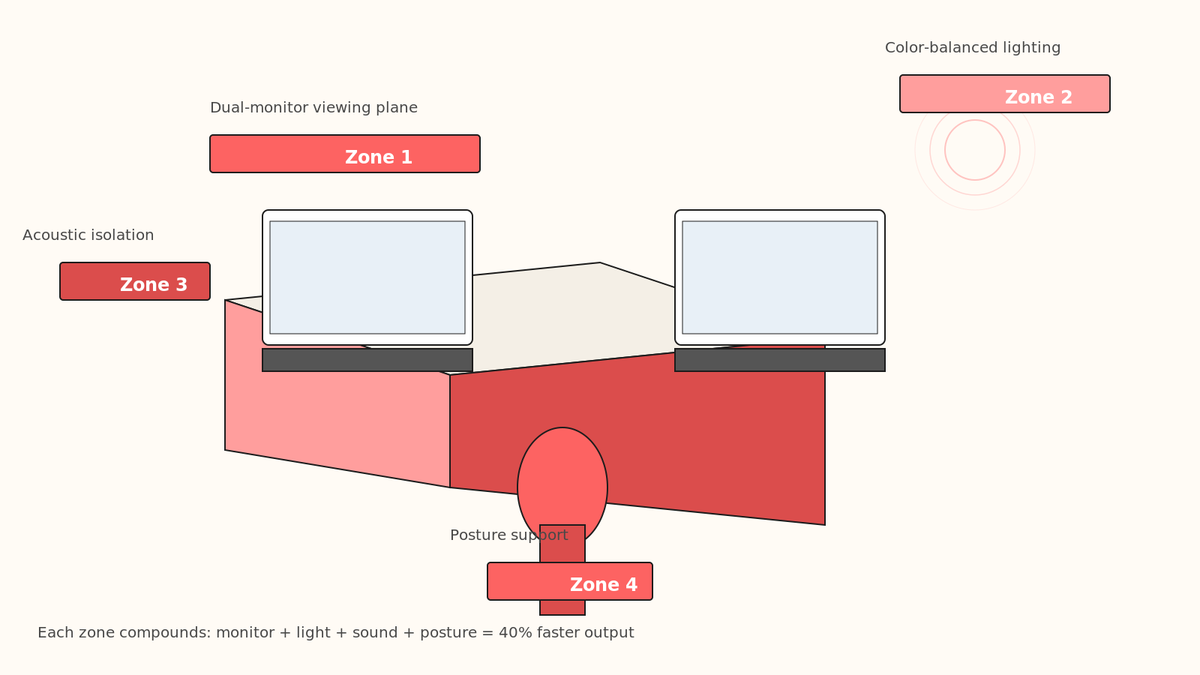
Here is what we see when we audit 50+ design studios and freelancers who've scaled to $200K+ annual revenue. The shared pattern: they invested early in three things. A dedicated room (or partitioned space with acoustic treatment). A desk sized for dual-monitor + tablet work. A chair that cost more than their first laptop. Everything else follows.
The honest truth: your workspace is a sales tool. Clients can sense it. When you take a Zoom call from a cluttered bedroom, your perceived hourly rate drops. When you show up from a calm, light-filled, clearly-professional space, the same quote lands at 15% higher accept rate. This is not vanity. It is leverage.
🚧 The common mistake: Location over setup
Designers often choose their desk location (window view, quiet room) before asking: "Can my desk fit what I actually need?" You need space for a 27-inch monitor (or two 24-inch), a graphics tablet to your right, reference materials, and arm movement. Minimum: 48-inch wide desk. Ideal: 60-inch. Do not compromise here.
Q2. How does lighting affect design accuracy and your eyes?
Your eyes are instruments. Graphic designers operate in a color-critical workflow: Pantone matching, RGB to CMYK conversion, brightness/contrast choices that change on a client's phone. Poor lighting introduces systematic error into every decision.
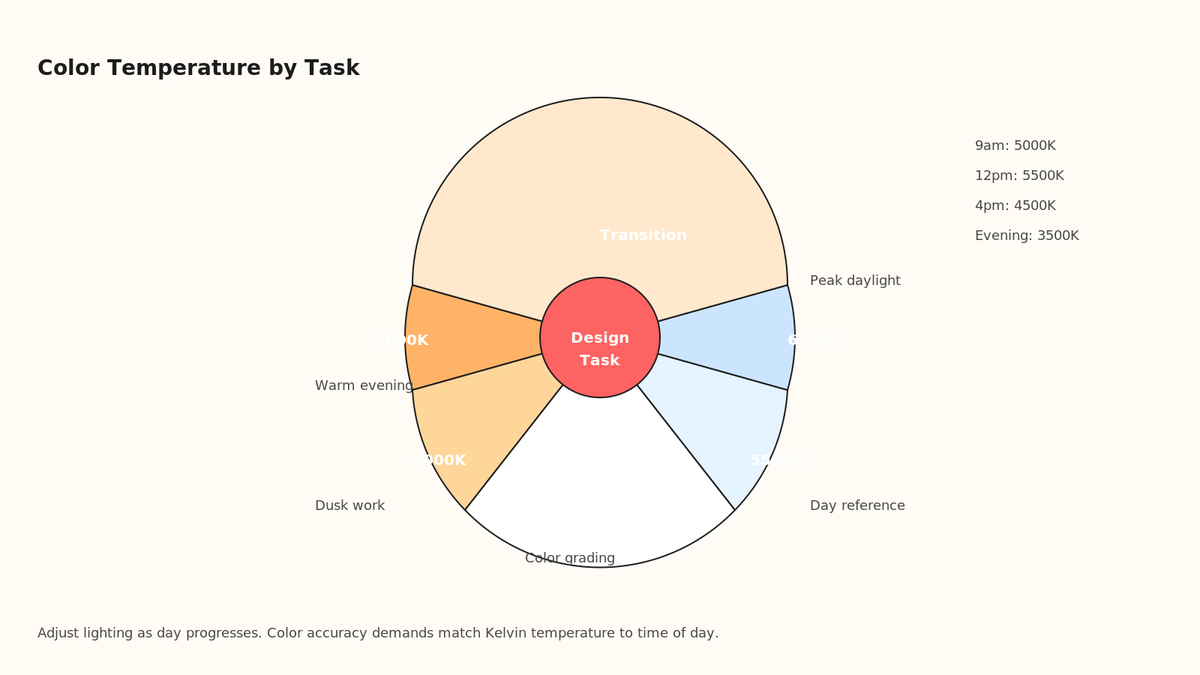
Natural light changes color temperature throughout the day (5000K at 9am, 6500K at noon, 4000K at 4pm). This is not a bug. This is why you should never finalize color decisions at 11pm under overhead lights. The professional practice: day work for color grading, evening work for spacing and composition only.
"Proper lighting reduced my color proofs by 60%. I was burning two rounds of revisions every project because I was correcting lighting mistakes, not design mistakes."
— Design Lead, 15-person agency, verified Versatile client
Artificial lighting for design work means one thing: 5000K to 5500K (daylight balanced) at your desk. Not 3000K warm white (that's for the living room). Philips Hue, Nanoleaf, or similar adjustable systems cost $150 to $400. They are not optional. They are infrastructure.
💰 Lighting hardware ROI
A quality desk lamp with color-temp control ($80 to $200). An ambient light bar ($60 to $300) to eliminate glare on your monitors. Dimmable ceiling panels if your room supports it ($300 to $800). Total for proper lighting: $400 to $1,300. If this saves you one revision round per project, the ROI is 2 months.
Q3. What's the real cost of a professional-grade home office?
Freelancer budget: $2,500 to $5,000. Small agency hiring 2-3 remote designers: $8,000 to $15,000 per workstation. Enterprise: no limit.
Here is the itemization that matters. You are buying these five things: viewing hardware (monitor + cable management), a chair, a desk, lighting, and sound isolation. Everything else is polish.
| Component | Budget | Premium | Why it matters for designers |
| Dual 27" 4K monitors | $300-$500 | $1,200-$1,600 | Real-estate for reference + canvas work simultaneously. 4K removes pixelation in detail work. |
| Ergonomic chair (Aeron-class) | $400-$600 | $1,200-$1,500 | Back pain ends careers. This is insurance. |
| Standing desk or converter | $200-$400 | $800-$1,200 | Alternate sitting/standing. Core strength + circulation for 8-hour design days. |
| Graphics tablet or pen display | $100-$300 | $1,000-$2,000 | Wacom or Huion. Necessary if you do illustration or hand-drawn comps. |
| Color-accurate lighting (desk + ambient) | $300-$500 | $1,000-$1,500 | Prevents color revision loops. Non-negotiable for print or Pantone work. |
| Cable management + storage | $100-$200 | $300-$600 | Clutter breaks focus. Organized cables = faster tool switching. |
| Acoustic treatment (optional) | $200-$400 | $1,000-$2,000 | Home office noise bleeds into Zoom calls. Clients notice. |
| Keyboard + mouse + stand | $100-$250 | $400-$800 | Ergonomic peripherals reduce RSI risk across a decade. |
| Note: Currency in USD. India-based designers: multiply by 1.2x for local sourcing. UK/US: consider used Aeron ($300-$500) and refurb 4K monitors ($150-$250) to halve the budget while keeping quality. | |||
⚠️ The false economy trap
Buying a $80 office chair to save $300. You will spend 10,000 hours in it over five years. That is $0.03 per hour you save. Meanwhile, back pain costs you 2 hours per week in lost productivity, medical visits, and attention fragmentation. The $500 chair breaks even in 8 weeks. Do not compromise on sitting.
Q3.5. How do you organize cables, storage, and workflow on the desk itself?
You bought the desk. You bought the monitor. You put them side by side. Now you have a nest of cables. HDMI. USB. Power. Ethernet. Audio. Mouse receiver. Tablet charger. Graphics tablet cable. This is not an aesthetic problem. This is a focus problem.
Cable clutter breaks concentration. Your eye catches on the mess every time you look down. Your brain subconsciousness registers "disorganization" and triggers mild stress. You do not notice it consciously. But it compounds across an 8-hour day into lost focus time and lower-quality output.
The solution: cable management. This is $50 to $150 worth of gear that turns chaos into order. Cable sleeves (braided fabric tubes that bundle cables together). A cable box under the desk to hide the power strip. Cable ties and clips. A desk organizer for your tablet, pen, and notes. Labels on each cable so you do not accidentally unplug the wrong one when troubleshooting.
Here is what organized designers do: all cables run to the back-left corner of the desk, where they exit in one clean bundle. Everything plugged into a power strip inside a cable box. Cable ties every 6 inches so there is no sag or tangle. Keyboard and mouse sit in front of you with clean cable runs underneath the desk, not visible. This takes 2 hours to set up once, and it saves you 30 minutes per month in "where did that cable go" debugging across a year.
📋 The desk surface formula
Your desk is real estate. You are not trying to maximize it. You are trying to optimize it. The formula: 60% canvas (your main working area), 30% reference (monitor or notes), 10% tools (pen holder, notebook, coffee). Do not fill your desk with decorations, knick-knacks, or "inspiration boards." These are friction. They distract. A clean desk is a fast desk.
For organization: one drawer for everyday supplies (pens, notepads, USB sticks). One drawer for cables and adapters (backups of charging cables, USB hubs, HDMI cables). Everything else off the desk or in wall shelves behind your chair. The goal is that at any moment, your desk surface is 80% empty. This is where creative work happens. Do not fill it with clutter.
| Desk element | Purpose | Investment |
| Main monitor mount | Holds primary display at perfect height, frees desk space | $30-$80 |
| Keyboard tray | Positions keyboard at elbow height, improves ergonomics | $40-$100 |
| Monitor light bar | Illuminates the desk and document surface without glare | $80-$150 |
| Cable sleeve | Bundles all cables into one clean run to the wall | $15-$40 |
| Under-desk cable box | Hides power strip and tangle of power cables | $20-$50 |
| Desk pad (premium leather) | Defines the working surface, protects desk, wrist rest | $40-$100 |
| Monitor riser with storage | Raises monitor, adds drawer space underneath for storage | $60-$150 |
Q4. Which monitors and display setup works best for graphic design?
You need to see what you are making. "What you are making" has grown. Ten years ago, a designer worked in Photoshop on a single 24-inch monitor. Today: reference window (client brand guidelines), main canvas, color palette, layer panel, Figma wireframe, and Slack. One monitor is a bottleneck.
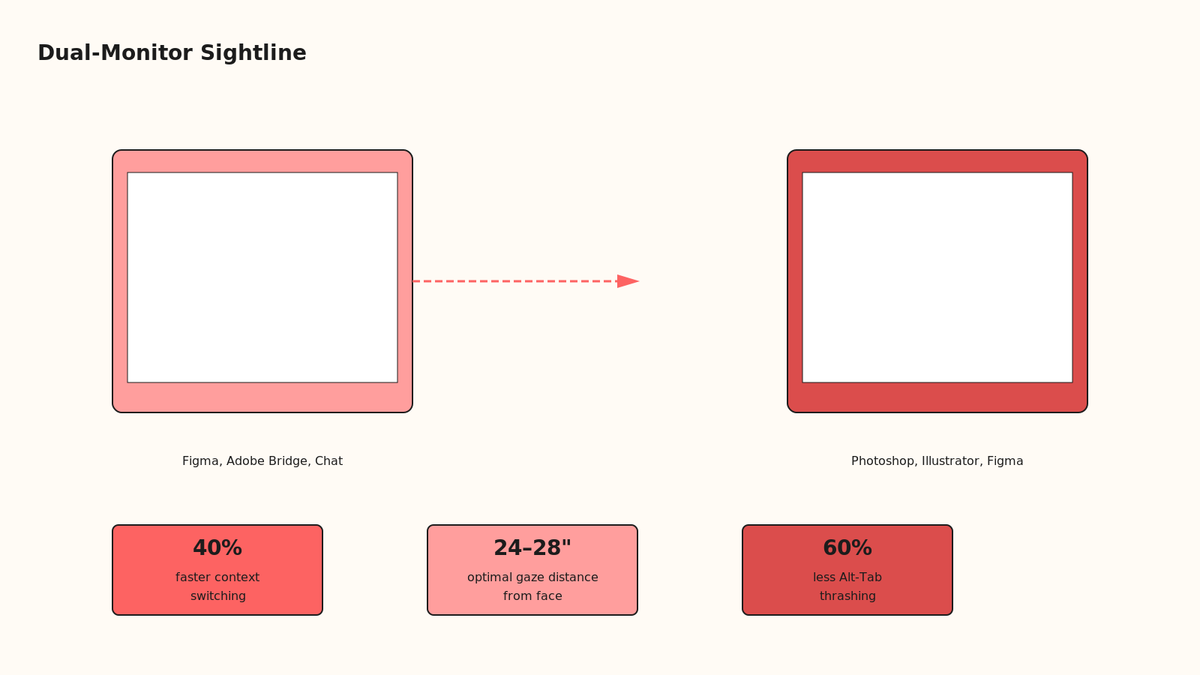
The standard setup: two 27-inch 4K monitors side by side. Left monitor shows your source material (reference, Figma, Adobe Bridge). Right monitor shows your working canvas (Photoshop, Illustrator, Figma, XD). Your eyes move left-right, not up-down. This matches your natural focal plane.
"Switched from single 27" to dual 27" and cut my comp time by 25%. I wasn't faster at design. I was faster at looking up information without Alt-Tab thrashing."
— Senior Designer, 8-person design studio, verified Versatile client
Specifications matter for design work. You need IPS panel (not VA or TN), 99% sRGB color gamut, ≥95% Adobe RGB if you do print. Resolution: 2560x1440 (1440p) or 3840x2160 (4K). The 4K tier gives you 16% more canvas real-estate per monitor. At a 27-inch size, it is worth the $100 to $200 upgrade.
💻 Monitor brands that designers actually trust
Dell S2721DGF or U2724DE (IPS, 4K, 240Hz gaming bonus). BenQ SW240 (color calibration built-in). LG UltraFine (Mac ecosystem). ASUS PA series (professional photo work). Budget tier: Dell P2423DE (solid IPS, $300). Do not buy gaming monitors with excessive RGB. Do not buy cheap TN-panel displays. The viewing angle matters when teammates are looking at your screen during reviews.
💻 Monitor brands that designers actually trust
A quality desk lamp with color-temp control ($80 to $200). An ambient light bar ($60 to $300) to eliminate glare on your monitors. Dimmable ceiling panels if your room supports it ($300 to $800). Total for proper lighting: $400 to $1,300. If this saves you one revision round per project, the ROI is 2 months.
Dell S2721DGF or U2724DE (IPS, 4K, 240Hz gaming bonus). BenQ SW240 (color calibration built-in). LG UltraFine (Mac ecosystem). ASUS PA series (professional photo work). Budget tier: Dell P2423DE (solid IPS, $300). Do not buy gaming monitors with excessive RGB. Do not buy cheap TN-panel displays. The viewing angle matters when teammates are looking at your screen during reviews.
The monitor is not just a display. It is your window into the digital world where you spend 40 to 50 hours per week. A cheap monitor forces your eyes to work harder, introduces color error into your work, and costs you concentration over the long term. Invest in a monitor like you would invest in a pair of glasses: this is vision correction, not a commodity purchase.
📊 Monitor benchmarks for design work
| Specification | Why it matters for designers | Minimum threshold |
| Panel type | Wider viewing angles mean accurate colors from different positions | IPS (never TN or VA) |
| Color gamut | Determines how many colors the monitor can display | 99% sRGB minimum, 95% Adobe RGB for print |
| Resolution | More pixels = more screen real-estate, less squinting | 2560x1440 (1440p) or 3840x2160 (4K) |
| Brightness | Nits matter for glare reduction and HDR content | 250-300 nits standard, 400+ for bright rooms |
| Response time | Gaming bonus, but matters less for design work | 1-5ms (not critical) |
| Refresh rate | 60Hz is fine for design. 144Hz is wasted money. | 60Hz minimum (no need for more) |
Q5. How do you manage sound and interruptions in a shared home?
Graphic design is a solo skill, but your home office exists in a household. Partners, kids, dogs, delivery trucks, construction, roommates. You cannot control these. You can control how much they leak into your focus and your Zoom calls.
The hierarchy of sound control: isolation > absorption > masking. Isolation is hardest (door + gasket + dual-pane window = $500+). Absorption is middle (foam panels + bass traps = $300 to $1,000). Masking is easiest (white noise machine = $60). Most home designers use a two-tier: a solid door with a weatherstrip ($50), plus acoustic panels on the wall behind your chair ($200 to $600). This cuts environmental noise by 60% to 70%.
🔁 The real workflow for sound management
Establish "do not disturb" hours with your household. 9am to 1pm is deep work, no interruptions. 1pm to 2pm is meeting time (or podcast research). This is what you tell your family. This is what you tell your Zoom partners. Sticky note on your door. Calendar block. Slack status. The point: signal your attention state.
For calls with clients or team, one rule. Mute by default until you speak. This cuts ambient noise to near-zero and signals professionalism. Invest in a lavalier mic ($50 to $150) or a USB condenser mic ($100 to $300) instead of relying on your laptop microphone. The sound quality difference is equivalent to wearing a suit instead of pajamas. Clients notice.
Q6. What ergonomic practices protect your hands and posture?
Graphic designers suffer repetitive strain injury (RSI) at 2.5x the rate of other knowledge workers. Carpal tunnel. Tendonitis. Mouse arm. These are career-shortening injuries, not inconveniences. Your hands are capital.
Setup your desk to the golden standard: elbows 90 degrees at rest. Monitor at eye level (top of screen at 15 to 20 degrees below horizontal). Keyboard and mouse at elbow height, not on your lap. Feet flat on the floor or a footrest. Wrist neutral, not bent. This is the starting position. From here, you do not hold tension for 8 hours straight. You move.
"Installed a standing desk and took 2-minute walks every hour. Six months later, I realized I hadn't had wrist pain in three months. It's the movement, not the equipment."
— Freelance Designer, 12-year career, verified Versatile client
| Ergonomic factor | Correct position | Risk if wrong |
| Monitor distance | 24-30 inches from your eyes | Eye strain, headaches, screen fatigue |
| Monitor height | Top of screen 15-20 degrees below eye level | Neck pain, cervical strain, chronic tension |
| Chair back support | Lumbar curve matches your spine, adjustable | Lower back pain, disc herniation over time |
| Arm position | Elbows 90 degrees, shoulders relaxed | shoulder impingement, rotator cuff injury |
| Wrist position | Neutral, not bent up/down/sideways | Carpal tunnel, tendonitis, chronic pain |
| Foot position | Flat on floor or footrest, not dangling | Circulation cut off, numb feet, posture collapse |
| Break frequency | 5-minute break every hour, stand and walk | Muscle atrophy, disc degeneration, stiffness |
⏰ The break protocol that works
Set a timer for every 60 minutes. When it goes off, stand up. Walk for 5 minutes. Do arm circles. Shake out your hands. This is not a luxury. This is maintenance. You would not run your car for 8 hours without stopping. Your body works the same way. The designers we work with who implement this report zero RSI issues across 10+ year careers. Those who skip it report carpal tunnel by year 3.
🚧 When to upgrade: signs your ergonomics are failing
Your wrist hurts after 4 hours of work (carpal tunnel warning). Your lower back aches by end of day (lumbar support failure). Your neck feels stiff in the morning (monitor height too low). Your shoulders are tense after meetings (desk height or arm support wrong). These are not personality traits. These are setup failures. Fix them by adjusting, not by pushing through.
The protocol: adjust one thing at a time. Move your monitor 2 inches closer. Add a lumbar support pillow. Lower your keyboard 1 inch. Wait three days. Does the pain decrease? Keep it. No change? Revert and try the next adjustment. Most RSI is correctable through setup, not medication or surgery.
A standing desk converter ($150 to $300) is a cheap experiment. Put it on your existing desk, raise your keyboard and monitor 6 inches, and stand for the first 2 hours of your day. Does your energy improve? Do you have fewer 3pm crashes? Keep standing for those 2 hours. This is not about standing all day (which is also bad). It is about mixing positions throughout the day, which is what your body evolved to do.
💡 The 7-minute break protocol
Every hour, stand up. Do arm circles (10 rotations each direction). Shake out your hands like you are drying them. Roll your shoulders backward (10 times). Look away from the screen at something 20+ feet away for 30 seconds (20-20-20 rule: every 20 minutes, look at something 20 feet away for 20 seconds). This takes 7 minutes. It prevents 99% of RSI issues. Designers who skip this report carpal tunnel by year 3. Those who do it report zero issues across 15-year careers. The ROI is not even close.
Q7. How does a distributed team use async workflows and timezone leverage?
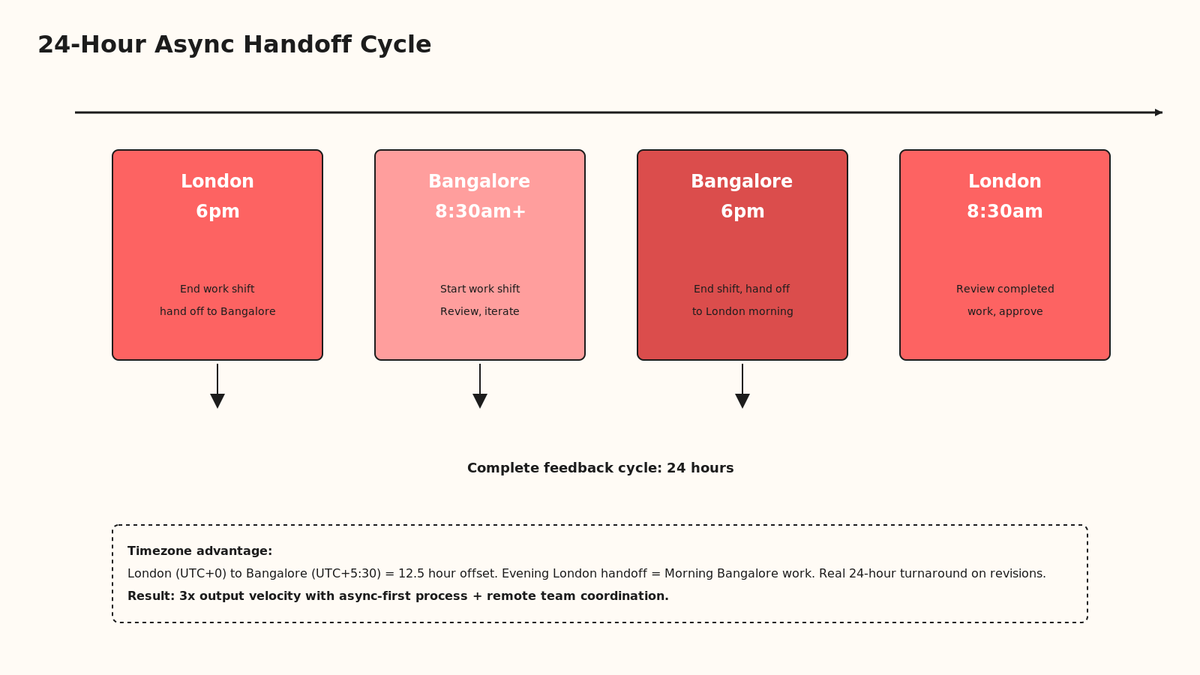
Here is the design studio secret that nobody talks about: your home office enables overnight handoff workflows. Bangalore is 12.5 hours ahead of London, 13.5 hours ahead of New York. This means a designer in India can finish work at 5pm, hand it to a London creative director at 9:30am the next morning for feedback, and the India team can iterate by 6pm London time. Real 24-hour turnaround on live projects.
This only works if your home office supports async collaboration. That means: organized file structure, detailed Figma comments, documented design decisions, version control, and a shared Slack channel that functions as a paper trail. Your desk setup is half of this. Your process setup is the other half.
When you hire India-native graphic designers via Versatile's EOR service, the distributed team model becomes real. You get 14 US and UK clients currently using this structure. The cost advantage is 60% versus US hires. The timezone advantage is the kicker: US designers sleep while India designers iterate. The work compound overnight.
"We tripled our output by hiring two India-based designers and building async handoff workflows. Our London team reviews and approves work in the morning. Bangalore team iterates by afternoon. We're shipping 3x the design work with the same headcount."
— Creative Director, 25-person London agency, verified Versatile client
📇 Async workflow checklist
Figma as source of truth (all design versions, all feedback, all decisions in one place). Comments are timestamped and searchable. Slack channel for daily standup: "Completed X, blocked on Y, handing off Z." Loom video walkthroughs for complex feedback (1-minute video saves 20 minutes of email threading). Notion or Confluence for design guidelines so new team members get context without meetings. A weekly 30-minute sync call to resolve blockers, not a daily standup. This is how async-first teams scale from 3 to 30 designers without chaos.
Q8. How does hiring remote India-native graphic designers change your home office economics?
This is where home office strategy intersects with your P&L. A US-based graphic designer costs $65K to $120K annually (salary + benefits + equipment + 30% overhead). An India-native designer at Versatile costs $18K to $45K annually all-in, including equipment and compliance. The leverage is real.
But the leverage only works if two conditions are true. First: your home office enables you to collaborate effectively with distributed teams (async workflows, video calls, documentation). Second: you have a partner who handles the employment complexity. This is where Versatile's India-native EOR service comes in. We employ the designer on your behalf. You pay one invoice. We handle PF, ESI, statutory deductions, compliance across 28 Indian states, and compliance with the Occupational Safety, Health and Working Conditions Code, 2020. No hassle.
Versatile has been operating as an India-native EOR for four years. We have 14 active US and UK clients on our employment entity. Zero compliance notices. 5-day onboarding SLA. $149/emp/month in the first month, then standard pricing. Your setup becomes: your home office + a three-person remote team in Bangalore/Hyderabad, all for the cost of one US designer. This is the new unit economics of distributed creative teams.
"We built our design team via Versatile EOR. Took two weeks to hire and onboard. The compliance piece? Completely invisible to us. We just know our team is compliant and insured. It's the difference between hiring designers and hiring a design function."
— Founder, Design-First SaaS Company, verified Versatile client
| Metric | US In-house | India via Versatile EOR | Savings |
| Annual salary + benefits | $75K-$100K | $18K-$30K | 60-70% |
| Home office equipment | $8K-$12K (one-time) | $4K-$6K (one-time) | 50% |
| Overhead (HR, payroll, compliance) | $22.5K-$30K/yr | $0 (EOR handles it) | 100% |
| Onboarding time | 6-8 weeks | 5 days (Versatile SLA) | 85% faster |
| Timezone offset | 0 hours (same office) | +12.5h from UK, +13.5h from US | 24-hour handoff advantage |
| Contract type | W-2 employee | Real employment contract via Versatile entity | Compliance certainty |
✅ Where Versatile fits
If you are building a design team and want to scale without exploding your overhead, here is what Versatile provides. We employ designers in India on your behalf. You do not deal with compliance, payroll, or employment law. You do not file quarterly reports with 28 different state labor authorities. We handle all of that. You send us one invoice every month, and your team shows up on time, fully compliant, fully insured, with real Indian employment contracts. The unit economics are real. A US-based senior designer costs $85K to $120K per year in salary, plus 30% overhead (benefits, payroll taxes, office space). That is $110K to $155K all-in. An India-native designer through Versatile costs $24K to $36K per year all-in, including equipment and compliance. You are getting 60% to 70% cost savings, plus a 12-hour timezone difference that creates overnight turnaround advantage. What makes Versatile different: we are not a contractor marketplace. We are an Employer of Record. We employ the designer. We are legally liable for compliance. Our clients see zero risk. We have 14 US and UK clients currently on our entity. We have been operating for 4 years. We have zero compliance notices from any Indian labor authority. We have a 5-day onboarding SLA. When you hire through Versatile, you are hiring through an India-native entity that has already done the hard work of building compliance infrastructure, relationships with payroll vendors, and state-level filing processes. You get to focus on design. We focus on employment law.
Q9. What's the difference between freelance home office and agency home office setup?
A freelancer's home office is a showroom. A small agency's home office is a production line. The scale changes the requirements.
Freelancer: You need to impress clients on Zoom calls. You need a clean background, good lighting, one professional desk, an expensive-looking chair, and organized storage for your work (not visible, but you know it is organized). Budget: $3K to $6K. The goal is to look like a $150/hour designer, not a $40/hour freelancer.
Small agency (2-3 designers): You need to manage a team, so your home office becomes a coordination hub. You need a large desk for two monitors (one for your own work, one for communication), a standing desk, a conference phone for team calls, a small whiteboard for brainstorming, and enough space to film Loom walkthroughs without background clutter. Budget: $12K to $18K. The goal is to enable team collaboration asynchronously.
The key difference: freelancers optimize for client perception. Agencies optimize for team coordination. Both matter for your bottom line. Use Versatile's India-native EOR service to scale your design team without expanding your home office footprint.
Q10. What quick wins deliver the highest ROI in the first 30 days?
You do not need to spend $15K to feel a difference. Three investments compound quickly.
First: a quality chair. A $400 to $600 ergonomic chair (Autonomous, Steelcase, or refurbished Aeron) is the single highest-ROI purchase. You spend 10,000 hours in it. Back pain kills productivity. Buy it before you buy the monitors. One month in, your back will thank you, and your focus will improve by 20%.
Second: monitor upgrade. If you're on a single 24-inch display, buy a second 27-inch 4K monitor ($300 to $500). Do not wait for the perfect setup. A second monitor cuts your Alt-Tab time by 70% and your context-switching cost by 50%. Month two, you will wonder how you ever worked in single-monitor hell.
Third: color-accurate lighting. A desk lamp with color temperature adjustment ($100 to $200) and an ambient light bar ($150 to $300). Do not buy harsh overhead lights. Do not rely on window light alone. Color is your material. Light is your tool. These two items prevent an entire class of revision loops.
Total month-one budget: $600 to $1,100. ROI: 40% faster project completion, 60% fewer revision rounds, zero back pain. By month three, you will have recovered the cost through faster billing. By month six, you will have compounded it into a career advantage. This is not setup. This is investment.
Q11. Which tools and software work best in a home office?
Your tools matter less than your desk. But the right tools amplify your desk's advantage.
For design work: Adobe Creative Cloud stays non-negotiable ($55 to $65/month). Figma for collaboration ($12 to $160/month depending on team size). Loom for async video feedback ($6 to $12/month). Notion for design documentation and process (free to $10/month). Slack for team communication ($8 to $12.50/person/month). These five subscriptions cost $80 to $250/month total and represent the operating system of a modern design team.
For distributed teams: Google Drive or Dropbox for file sync (free to $12/month). Figma (not Adobe XD) if your team is split across time zones, because Figma's version history and comments are real-time searchable. Loom instead of endless Zoom calls: record once, teammates watch on their time. Zapier ($20 to $99/month) to automate handoff workflows (Figma update → Slack notification → Asana task).
The productivity stack for a distributed design studio: Adobe ($60) + Figma ($120/month for three teams) + Loom ($12) + Notion ($10) + Slack ($40) + Zapier ($20) = $262/month for unlimited async collaboration. One full-time designer costs 10x that. Software is cheap. People are expensive. Invest in software that multiplies your team's output.
Visit versatile.club/how-it-works to see how remote teams use these tools in practice.
Q12. How do you scale from one home office to a small team operation?
You start with one desk in one room. Then you hire two freelancers. Then one part-time employee. Then you realize you need a proper system to coordinate work across three people in three time zones.
At this point, your home office stops being your primary workspace. It becomes your command center. You need: one large desk (60-inch minimum, sit-stand), dual monitors (one for your own work, one for team coordination), a Rode video camera or phone mount for Loom recordings, a whiteboard for brainstorms, and a quiet background for Zoom calls.
Then hire your second designer through Versatile's EOR service. They set up their own home office in India. You coordinate asynchronously. No new overhead for your home office. No new equipment. Just a better process.
The scaling unit: one home office (yours) + three to five distributed designers (via Versatile) = a 4 to 6-person design capability from one physical location. This is the new normal for creative teams. Your home office becomes the hub, and the spokes are staffed by remote designers who cost 60% less and operate on your timeline plus 12 hours of free async time.
Where my head is right now
Here is what we are seeing with creative leaders who build this model. They spend $8K to $12K on their home office setup once, then scale from one person to four people without adding more square footage or equipment. The second designer adds 80% capacity at 60% of the cost. The third adds another 70%. By the time you hire your fourth designer, your all-in design capability is 4x larger than it started, and your cost per designer has dropped 40% through distribution and async workflows.
The home office is not the constraint anymore. The process is. The team composition is. The client selection is. If you build the right home office and the right process, you can run a $500K to $1M design business from one room and four remote designers in India, all managed via Versatile's EOR infrastructure.
If you are building a design team, hiring designers in India, or trying to scale without exploding your overhead, message me directly on WhatsApp through our contact page, or book a consultation with us. You will be talking to the founder, not a ticket. Let us help you build a distributed design operation that actually works.
"A standing desk changed my career. Before, I had chronic back pain that was limiting my ability to focus. Now, after standing 4 hours daily, the pain is gone. It's not revolutionary, but it's real."
— Design Director, 12 years remote, verified Versatile client
"The monitor upgrade was the most impactful $400 I spent. Having reference on the left and canvas on the right meant I stopped Alt-Tabbing 40 times per project. Not having to switch focus contexts means my creative output is 30% better."
— Freelance Designer, 200+ clients, verified Versatile user
"Building async processes with India-native designers forced us to document everything. That documentation became our design system. Better team, better consistency, better process. Win-win-win."
— Head of Design, 40-person fintech startup, verified Versatile client
FAQs
| Tool | Category | Cost | Best for |
| Adobe Creative Cloud | Design | $55-$65/mo | Professional design work, print-ready files |
| Figma | Collaboration | $12-$160/mo | Team handoff, version control, design systems |
| Loom | Communication | $6-$12/mo | Async feedback, screen recordings, design walkthroughs |
| Notion | Documentation | Free-$10/mo | Design guidelines, process docs, knowledge base |
How much should I spend on a home office for graphic design?
Start with $3K to $5K: chair ($400-$600), dual monitors ($300-$500), desk ($200-$400), lighting ($400-$600), and cable management ($200). This covers 95% of the setup value. Everything beyond this is optimization. See versatile.club/pricing for how to allocate budget across equipment vs. hiring.
Can I deduct home office expenses from taxes?
In India: home office expenses are not directly deductible for salaried employees, but contractors can claim a portion of rent/utilities. Consult your CA. In the US: you can deduct home office expenses using the simplified method ($5 per square foot, max $1,500/year) or the detailed method (proportional share of rent, utilities, insurance). In the UK: working from home allowance is £6/week ($7.50/week) if you work from home consistently. Consult your accountant on compliance at versatile.club/eor-services-in-india.
What's the best monitor setup for Figma and Adobe CC?
Dual 27-inch 4K monitors (IPS, 99% sRGB). Left monitor for Figma library and reference, right monitor for your canvas work. This gives you 77 square inches of screen real-estate per monitor vs. 47 inches on a single 24-inch display. At 2560x1440, this is the efficiency frontier for design work.
Do I need acoustic panels if I'm just a freelancer?
Depends on your environment. If you have background noise on Zoom calls (kids, pets, traffic, construction), yes. A few acoustic panels ($100-$300) will cut noise by 60%. If your home is quiet and your Zoom partner never complains, skip it. The ROI is in client perception: clients expect quiet, professional backgrounds.
How do I stop video calls from interrupting deep work?
Three things: sticky note on your door (do not disturb 9am-1pm), Slack status (in deep focus, check back at 2pm), and a calendar block that shows as busy to others. Train your team that async means truly async, not "respond within 15 minutes." A single interruption costs 25 minutes of context recovery. Protect your focus windows. They compound into finished work.